

Frequently Asked Questions
Product Basics & Gameplay
Learn about QRSong! and how it works
QRSong! is a service where you pay once and own your QR music cards forever. There are no recurring fees, monthly charges, or hidden subscription costs. The price of a deck depends on two things: whether you choose the digital PDF version or physical cards, and how many tracks are in your playlist. The gift box and the QRGames! add-on are optional extras, each with a one-time price. Once you purchase, your cards are yours to keep and use as many times as you want without any additional costs.
QRSong! generates QR music game cards based on your playlists from Spotify, YouTube Music, Tidal, or Deezer. Simply share the URL of your playlist with us, upload your design and we'll create a set of cards that link to your music: Either as a digital PDF or as real, physical cards that we will ship to you. You can then use our free companion app to scan the cards and play the music. The app will start playing the song with the artist and title concealed.
The cards are perfect for game nights, parties, or just for fun! You can use them to play a music quiz with your friends, challenge your family to guess the song, or simply enjoy your favorite music in a new way. The cards are also a great gift for music lovers!
The first time around you will be asked install our app on your phone. After this is done you can use the app to scan the cards. The song will start playing automatically and you can start guessing the song and artist!
The first time around you will be asked install our app on your phone. After this is done you can use the app to scan the cards. The song will start playing automatically and you can start guessing the song and artist!
Though there are quite a few similar services out there, we believe our attention to detail and commitment to quality set us apart. We use an advanced AI algorithm to determine the release year of each song, while other services solely look at the release year provided by Spotify, which is not very accurate.
For example: Try uploading the playlist below to our competitors and see what happens:
https://open.spotify.com/playlist/5hAC4oIL7LG6TVgaUBVpKs
Most services will mess up remasters, and different recordings of the same song.
QRSong! uses a combination of online sources to determine the correct release year and hand checks songs to make sure you get the best possible experience with your cards.
For example: Try uploading the playlist below to our competitors and see what happens:
https://open.spotify.com/playlist/5hAC4oIL7LG6TVgaUBVpKs
Most services will mess up remasters, and different recordings of the same song.
QRSong! uses a combination of online sources to determine the correct release year and hand checks songs to make sure you get the best possible experience with your cards.
Yes! After your order is completed, you can opt-in to feature your playlist on our website. When other customers discover and purchase your playlist, you'll earn discount credit that can be used on future orders. There's no limit to how much you can earn! Your personal information is never shared - only your playlist title and description are shown. Learn more on our Earn Discount page.
Already placed an order before this feature was available? Contact us and we'll send you your personal link!
Already placed an order before this feature was available? Contact us and we'll send you your personal link!
Design & Customization
Customize your cards and the app, and choose versions
Yes! You can design your own cards by uploading a background image and/or logo to completely customize your cards to your liking. You can also choose a font and playlist icon so you can quickly recognize which set it belongs to. The design process is simple and easy to use. You can see a preview of your design before finalizing it. View our design examples for inspiration or start designing now.
Some examples:
Some examples:


Yes. In the card designer you can give one deck up to 10 designs. They take turns in the order of your playlist: card 1 gets design 1, card 2 gets design 2, and so on, starting again after the last one. Every design can have its own background, logo, font, QR code colours and back side, so you can use several photos of the person you are celebrating, the different visuals of your company, or simply a mix of colours. A new design starts as a copy of the one you are editing, so you only change what should differ. Alternating designs cost nothing extra and work for real cards and digital PDFs alike, and you can still change them after ordering, while you review your cards. Start designing now.
Yes, with App Designer. You choose the background (a colour, a gradient or your own photo), the text and accent colours, the font, your own logo, the animations and your own help text, or let AI build the whole look from one photo. Your guests keep using the free QRSong! app for iPhone and Android: as soon as they scan the first card of one of your playlists, the app switches to your design. See the App Designer page for examples.
App Designer is a one-off upgrade on your account for $10.50, including VAT. It is not a subscription and there is no price per playlist: your design applies to every playlist you bought, and to the ones you buy later. You switch it on in My Account, where you can design and preview the app before you pay.
Whenever you like, as often as you like, in My Account. The next card that is scanned shows the new version. Nobody has to update the app.
Yes! After you complete your purchase, you can make corrections to the song titles, artists, and release years. You can even add extra information to the cards. Like musical genres, or a fun fact about the song or artist. Once you are satisfied with your corrections, you can submit them to us for review.
Yes! You can add extra information to the cards, such as musical genres, a personal message, or any other information you would like to include. This is a great way to personalize your cards and make them even more fun to use.
Yes! We will ship real, QR music cards to your doorstep. They are made of high-quality paper (350g) and printed double-sided in full color. But it is also possible to order a digital version.
The digital version is a PDF file which we will mail to you straight away. It is cheaper than the real thing, but you will have to print and assemble the cards yourself.
Download example PDF
We currenlty offer two digital versions: A single sided version and a double sided version. The double sided version is perfect for those who have a double sided printer (Duplex). If you do not have a double sided printer we advise you to choose the single sided version. It is a little bit more work, but it will be easier to allign the cards correctly
Download example PDF
We currenlty offer two digital versions: A single sided version and a double sided version. The double sided version is perfect for those who have a double sided printer (Duplex). If you do not have a double sided printer we advise you to choose the single sided version. It is a little bit more work, but it will be easier to allign the cards correctly
Version Comparison
Single sided

Double sided

The eco-friendly version replaces the full-color background with a white background on the QR code side. This version is perfect for those who want to save on ink and still keep all functionality of the cards and app.
Card Comparison
Default card

Eco-friendly card

Ordering & Delivery
Shipping times and order process
A normal order will be printed and shipped within 2-3 business days. We currently ship worldwide from the Netherlands. For detailed shipping times and costs per country, please visit our shipping information page.
If you order from our pre created playlist, the digital version will be mailed to you immediately. If you order a playlist from your own collection our AI algorithm will determine the correct release years, which will be double checked by our team. Once this is done you will receive an e-mail with a link to download your digital cards. This will take no longer than 24 hours. During European office hours this is usually much faster.
Technical Requirements & App
Phone compatibility and app features
Yes! Almost any smartphone with a camera can scan the QR codes on the cards. If you have an iOS or Android phone that can scan a QR code, you can use our cards. An installed version of Spotify Premium is required to play the music after scanning the QR code.
If you are using Spotify for playback, Premium is recommended. Spotify Premium supports our 'Hidden mode' which will play the song without you seeing the artist and title. If you have Spotify Free the song will still play, but you will see the artist and title after 3 seconds so you will have to flip your phone quickly if you do not want to see the answer. If you use another music service like Apple Music, YouTube Music, Tidal, or Deezer, this does not apply.
QRSong! supports playlists from Spotify, YouTube Music, Apple Music, Tidal, and Deezer. Simply paste the URL of your public playlist from any of these services, and we'll generate your QR music cards. Each platform has different capabilities - see our supported platforms page for a detailed comparison of features like release year data and hidden playback support.
Apple Music users: Your QRSong! cards are compatible with Hitstalt - an app that plays QR music cards through Apple Music with hidden playback support!
Apple Music users: Your QRSong! cards are compatible with Hitstalt - an app that plays QR music cards through Apple Music with hidden playback support!
No. Everyone uses the same free QRSong! app from the App Store or Google Play. As soon as the first card of one of your playlists is scanned, the app switches to your design, on the home, scan, playing, settings and help screens. A card from another set shows that set's look.
Yes. Your default design is used for all your playlists, but you can give any playlist a design of its own, or the standard QRSong! look, which is handy for cards you give to someone else. The app shows the right design for every card that is scanned.
Yes. Besides our own QRSong! cards, the app also reads Hitster cards and cards from selected other QR-based music card games. Which other cards it supports is our choice, and that list can change.
We use an advanced AI algorithm to determine the release year of the song which will be double checked manually by our team. We do this because the release year in Spotify is not always correct. We use a combinations of sources and let our AI algorithm determine the correct year which leads to a more accurate result. If you still find a song with the wrong release year, please let us know!
On newer Android phones, especially Samsung, a small notification tile can appear at the top of the screen showing the currently playing song's artist and title. Here's how to hide it.
Samsung (One UI 7 / 8): go to Settings → Lock screen and AOD → Live notifications and turn Media player off. On some devices this option is not in the menu directly; use the search field in Settings and search for 'Live notifications'. Note that this also removes media controls from the lock screen, but during QRSong! gameplay you don't want those visible anyway.
Stock Android / Pixel: long-press the Spotify notification in the notification shade, tap the gear icon, and disable the 'Now playing' or 'Media playback' notification channel. As a stronger fallback, go to Settings → Notifications → Notifications on lock screen → Don't show any notifications to hide all lock-screen notifications.
No-settings alternative: place the phone face-down during play, or play through an external speaker.
Samsung (One UI 7 / 8): go to Settings → Lock screen and AOD → Live notifications and turn Media player off. On some devices this option is not in the menu directly; use the search field in Settings and search for 'Live notifications'. Note that this also removes media controls from the lock screen, but during QRSong! gameplay you don't want those visible anyway.
Stock Android / Pixel: long-press the Spotify notification in the notification shade, tap the gear icon, and disable the 'Now playing' or 'Media playback' notification channel. As a stronger fallback, go to Settings → Notifications → Notifications on lock screen → Don't show any notifications to hide all lock-screen notifications.
No-settings alternative: place the phone face-down during play, or play through an external speaker.
Product Details & Quality
Card specifications and quality information
The cards are 60 x 60 mm (2.36 x 2.36 inches) for both the real and digital cards.
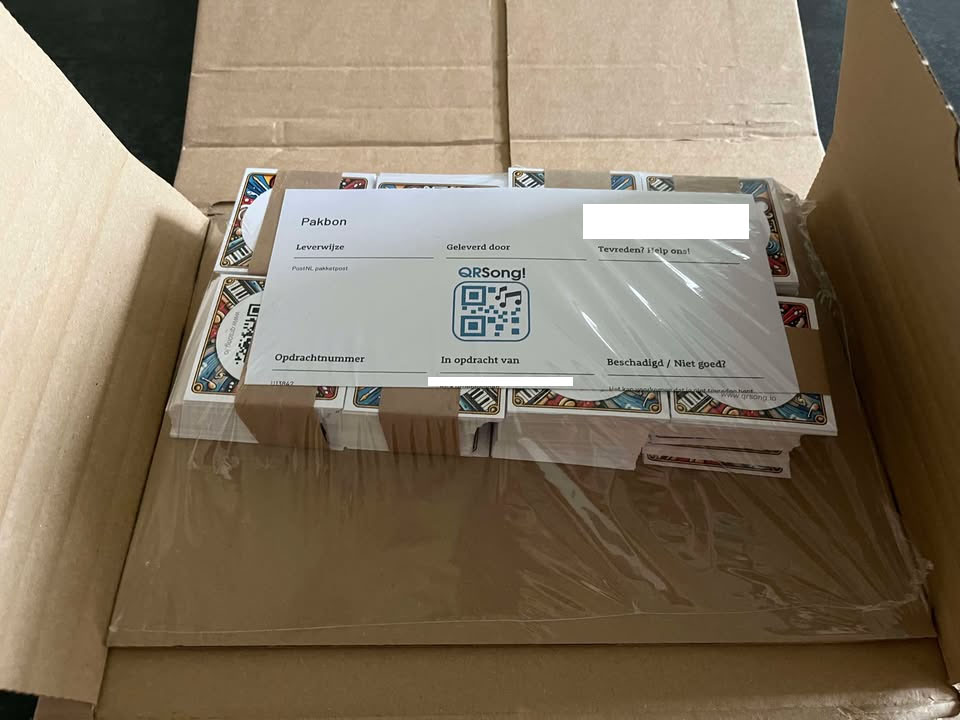
The cards are double-sided and printed on high-quality paper (350gsm). They arrive neatly tied together with a paper band in a shipping box that fits your mailbox.
Want to make it extra special? You can add a custom gift box during checkout. Good to know up front: our gift box is decorative gift packaging. It is not a rigid, premade game box like the ones you find with common retail board games. It arrives as a flat, printed A3 cardboard sheet that you press out and fold into a 12 x 12 cm box yourself at home. No glue or tools needed. Together with the box you receive a printed insert card (which you design yourself) that sits behind the window on the lid.
You can see some more examples on our examples page.
Want to make it extra special? You can add a custom gift box during checkout. Good to know up front: our gift box is decorative gift packaging. It is not a rigid, premade game box like the ones you find with common retail board games. It arrives as a flat, printed A3 cardboard sheet that you press out and fold into a 12 x 12 cm box yourself at home. No glue or tools needed. Together with the box you receive a printed insert card (which you design yourself) that sits behind the window on the lid.
You can see some more examples on our examples page.
The gift box is an optional add-on when ordering real QR cards. What it is (and what it isn't): it's decorative gift packaging that ships flat as a printed A3 cardboard sheet you fold yourself. It is not a rigid, premade game box like the ones you find with common retail board games. Personalized hard game boxes at that quality simply aren't produced by print-on-demand companies. Our gift box is designed to look beautiful as a present, not to replace a manufactured retail box.
Here's how it works:
1. Design your insert card
After designing your QR cards, you enter the box designer. Here you design a custom 12 x 12 cm insert card that sits behind the window on the lid. You can customize four things:
2. Receive your flat A3 cardboard sheet
The box arrives as a flat printed A3 cardboard sheet, together with your printed insert card. Press out the shapes and fold along the pre-scored creases. No glue or tools needed, just a few minutes of folding.
3. Fill it up
Once folded, the box is 12 x 12 cm with a window on the lid that shows your custom insert card. It holds up to 190 QR cards with a built-in divider to keep them organized. Place the insert card behind the window, close the lid, and your gift is ready!
Here's how it works:
1. Design your insert card
After designing your QR cards, you enter the box designer. Here you design a custom 12 x 12 cm insert card that sits behind the window on the lid. You can customize four things:
- Lid image: the image visible through the window on top
- Logo: placed on top of the lid image
- Inside background: the background on the back of the insert card (visible when you open the box)
- Inside text: a personal message on the back of the insert card
2. Receive your flat A3 cardboard sheet
The box arrives as a flat printed A3 cardboard sheet, together with your printed insert card. Press out the shapes and fold along the pre-scored creases. No glue or tools needed, just a few minutes of folding.
3. Fill it up
Once folded, the box is 12 x 12 cm with a window on the lid that shows your custom insert card. It holds up to 190 QR cards with a built-in divider to keep them organized. Place the insert card behind the window, close the lid, and your gift is ready!
Each gift box holds up to 190 QR music cards. If your playlist has more songs than that, additional boxes are added automatically, one extra box for every 190 cards. For example, a 250-card playlist ships with 2 boxes, and 400 cards ships with 3. The number of boxes is shown during checkout, so you'll always know exactly what's coming.
Multi-box orders also get bulk savings. See the gift-box pricing question below for the per-box prices.
Multi-box orders also get bulk savings. See the gift-box pricing question below for the per-box prices.
A single gift box costs €6.99. If your playlist needs multiple boxes, the per-box price drops automatically:
The discount applies per playlist in your cart. The exact total, including any savings, is always shown during checkout before you pay.
- 1 box: €6.99
- 2 boxes: €6.00 each (save 14%)
- 3 boxes: €5.00 each (save 29%)
- 4 boxes: €4.50 each (save 36%)
- 5 or more boxes: €4.00 each (save 43%)
The discount applies per playlist in your cart. The exact total, including any savings, is always shown during checkout before you pay.
We do our best to provide you with the most accurate information, but mistakes can happen. If you find an error in the data on your cards, please let us know. If it is indeed a mistake we will correct it and send you the digital, corrected version of your playlist for free!